
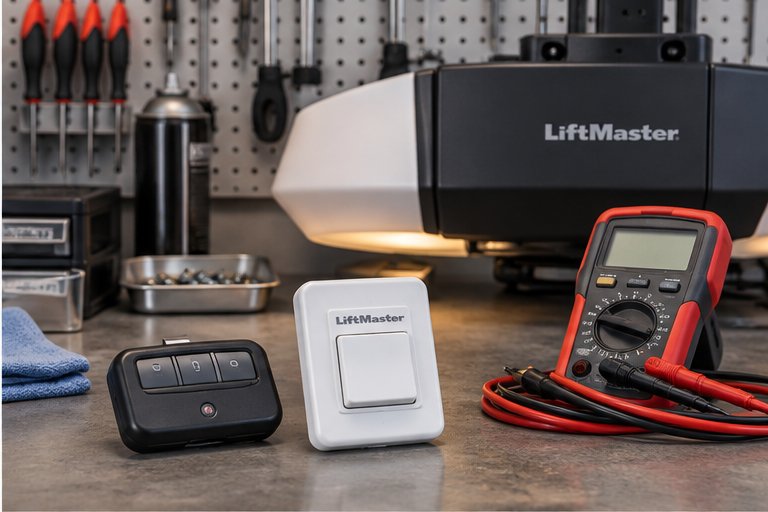
How a remote talks to the opener
A garage remote is a tiny radio transmitter. When you press the button it sends a coded signal, and the receiver inside the opener listens for it. If the code matches one it has learned, the opener runs the door. If the code is unfamiliar, the opener ignores it.
That is why a new remote does nothing until it has been taught to the opener, and why a lost remote can be removed from the opener's memory so that it no longer works. The process is called programming, or pairing. It is not complicated in principle, though the exact steps differ between makes and generations of opener.
Rolling codes in plain terms
Older openers used a fixed code, which meant the same signal was sent every time. Anyone with the right equipment could record it and replay it. Modern openers use what is called a rolling code. Each time you press the button, the remote sends a different code, drawn from a long sequence that the opener also knows.
The opener accepts the next code in the sequence and then moves on. A signal that has already been used is useless. This is a large part of why modern remotes are harder to copy. It also explains why a remote must be properly paired, since the remote and the opener need to be following the same sequence.
Types of controls we program
There are several kinds of controls that can open a garage door, and most households use more than one. We can set up the ones you need and explain how each one behaves.
Handheld and visor remotes
These are the familiar small remotes, either on a key ring or clipped to a car visor. They are the most likely to be lost or drained, and the easiest to replace.
Wireless keypads
A keypad mounts outside the door and lets you enter a code. It is handy for children coming home, dog walkers, guests and anyone who might leave the remote in the car. Most keypads let you set a personal code and, on some models, temporary ones.
Wall controls
The button inside the garage is wired to the opener. Many have extra features, such as a lock to disable remotes while you are away, or a light control. Faults here are different from remote faults and are covered on a separate page.
Buttons built into vehicles
Some cars and trucks carry three buttons in the mirror, visor or dashboard that can learn a garage door signal. They are programmed through a sequence involving both the vehicle and the opener, and compatibility depends on both.
Programming a new remote
For most openers, programming is done at the motor head. A learn button on the unit, usually near the antenna wire or under the light cover, puts the opener into a learning mode for a short period. You then press the button on the remote, and the opener confirms with a light flash or a click.
Some openers use a different method, such as a button on the wall control held for a set time, or a code entered through the keypad. A few models show a numbered light that tells you which kind of remote they expect, and the color or count can hint at the generation of the unit. This is another reason we look at the opener before touching a remote.
Pairing also has a time limit. The learning mode stays open only for a short period, and if the remote is not pressed in time, the opener closes the window and the attempt must be repeated. When several remotes are being paired, each one is taught in turn.
We follow the procedure for the specific model in front of us and then test several times from different spots in the driveway. If the door has to be moved to check the pairing, we confirm that the path is clear and that the sensors are working first, as described on our safety sensor page. Hand-held remotes from one opener family generally do not work on another, which is why we confirm compatibility before anyone buys a replacement.
Setting up a wall keypad
A keypad is paired in a similar way, with an additional step of choosing your personal code. A good code is one that is easy for your household to remember and hard for outsiders to guess. Avoid birth years, house numbers and simple runs of digits.
After pairing, we test the keypad from outside, check that the buttons are responsive, and confirm that the cover seals against rain. We also explain how to change the code later, as many people prefer to refresh it after contractors, guests or house sitters have used it.
- Choose a code that is not tied to an address, date of birth or phone number.
- Change the code if a short-term worker or visitor has been given it.
- Shield the keypad with your hand when entering the code in public view.
- Replace the battery in the keypad as soon as the buttons grow unresponsive.
Replacing a lost remote
Losing a remote is more than an inconvenience, because someone else may pick it up. If it fell out of a car, was left in a rental or went missing during a move, the safest course is to remove it from the opener's memory and program a new one.
Most openers allow every stored remote to be cleared at once. After clearing, only the controls you program again will work. That is the quickest route to being sure a missing remote cannot open the door. If you also lost a vehicle with a remote inside, or if keys went missing with it, you may wish to review other security measures; our guide on garage door security has suggestions.
Remote not working: a few safe checks
Before concluding that a remote needs programming or replacement, try the simple checks. They are safe, require no tools and often solve the problem. Do not touch the springs, cables or side brackets at any point.
- Try the wall button. If the door responds, the opener is fine and the issue is in the remote.
- Replace the battery in the remote with a fresh one of the correct type.
- Test from close to the door, then from farther away, to see whether range is the issue.
- Check that the antenna wire hanging from the motor head is intact and not tucked away.
- Look at the wall control for a lock or vacation setting that disables remotes.
- Try a second remote, if you have one, to separate a remote fault from an opener fault.
Range and interference
Remote range depends on the transmitter, the receiver, the antenna and the surroundings. In Florida homes, metal roofs, heavy stucco with wire mesh, large vehicles and other radio sources can all shorten it. A new LED lamp or a wireless device placed near the opener can add noise.
If range has dropped, begin with the remote battery. After that, look at the opener's antenna. Straightening it and letting it hang loose often helps. If the receiver itself is weak, there are sometimes external receivers or extended antennas that can help, though availability depends on the make. Our page on the remote not working problem describes more patterns.
When a keypad or remote fails after a storm
Humidity and water are hard on small electronics. A keypad outside the door sits in the open, and rain can reach the contacts if the cover does not seal. After a storm or a heavy damp spell, a keypad may stop responding, show a dim display or accept some buttons and ignore others.
Remotes left in a car can suffer from heat, which weakens the battery and can damage the circuit board. If a control has been wet or overheated, we usually replace it and program the new one. The problem may also be in the receiver if several controls stop at once, in which case we look at the opener, as described in our opener repair page.
Smart control and phone access
Some households replace or supplement remotes with a phone app. That requires a compatible opener or an add-on module, a Wi-Fi network that reaches the garage and an account with the maker. When set up well, it gives you a view of the door's status and the ability to let someone in remotely.
Phone control does not replace the need for a physical remote or keypad, especially if the internet is down or the phone battery is flat. We often program both, so that the household has more than one way in. See our page on smart opener and Wi-Fi setup for more.
Rental properties, move-ins and sale
Remotes change hands more often than most people think. When you buy a home, rent a property or take over a business space, you cannot be sure how many remotes exist or who has them. Clearing the opener's memory and programming only the controls you hold is a sensible first step.
Landlords and property managers also use keypads with codes that can be changed between tenants. If you are preparing a house for sale, working remotes and a keypad that functions are a small thing buyers notice. Our guide on garage doors for rental properties covers more of this.
What a programming visit covers
On a visit for remotes and keypads, we check the opener and the wall control first, since a fault in either can look like a remote problem. Then we clear any controls you want removed, pair the ones you want to keep, and program new ones.
We test each control from several spots and confirm that the opener responds the same way every time. Because programming sometimes reveals that the opener itself is ageing, we also glance at the sensors and the reverse response. We explain what we find, and we do not move to any other repair without your agreement.
Who should hold a control, and who should not
Every remote or code you hand out is a key to the garage, and in many homes the garage door is the most used entrance. It helps to think about who really needs access and what kind. Family members who come and go daily are well served by a remote in the car. Occasional visitors, such as a house sitter, a cleaner or a delivery arrangement, are often better served by a keypad code that can be changed afterward.
Think about contractors in particular. A crew working on the house for a week does not need a permanent remote. A temporary code or letting them in manually, and then changing the code, avoids lingering access. If your keypad supports a temporary code, ask us to show you how it works.
Teenagers and young children deserve a clear conversation too. A remote is not a toy, and a closing door can be dangerous. Keep spare remotes out of reach of small children, and explain that the wall button and the door are not for play.
Finally, think about how a remote is stored in a car. A remote left clipped to the visor of a vehicle parked on the street is an invitation. Taking it with you, or using a built-in vehicle button, is a sensible habit that costs nothing.
Keeping controls working
A few habits make controls last longer. Replace remote batteries before they fail completely, and keep spare remotes where you can find them. Avoid leaving remotes on a hot dashboard. Wipe the keypad occasionally and check that its cover sits flush.
Write down which controls are programmed to which door, especially if you have more than one garage. Keep a record of how many remotes you have, so that you know when one is missing. When a control is lost, act promptly. If the opener seems unable to hold new programming, or controls drop off after a few days, it may indicate a receiver or board fault.
Questions and answers
Try a fresh battery first. If the remote still does nothing and the wall button works, the remote may have lost its pairing or failed. A remote that works close to the door but not far away usually has a weak battery or an antenna issue. We can test it and program a replacement if needed.
No. Remotes must use the same signal system as the opener's receiver, and these differ between makes and generations. Buying a remote that looks right is not enough. We confirm compatibility with your model before programming, so you are not left with a control that cannot be paired.
It means the remote sends a different code each time you press the button, drawn from a sequence the opener also follows. Because a used code is not accepted again, copying the signal is far less useful. It is a standard security feature in modern openers.
A lost remote can open the door for whoever finds it, if they know which house it belongs to. The safe response is to clear the opener's memory and program only the controls you hold. It usually takes little time, and it removes the missing remote from the system.
Often yes, though compatibility depends on both the vehicle and the opener. The procedure involves steps on each side, and newer security features can add a step. We handle the garage side and show you the vehicle side, and we are honest if a combination may not work.
Moisture can reach the contacts, drain the battery or damage the circuit if the cover does not seal well. Try replacing the battery and drying the unit. If it keeps failing, the keypad itself usually needs replacing, and we program the new one to the opener.
Usually yes. A new opener has its own receiver and memory, and older remotes may not be compatible with it. We program the controls you need during installation so that everything works when we finish, and we tell you which of your old controls can be reused.